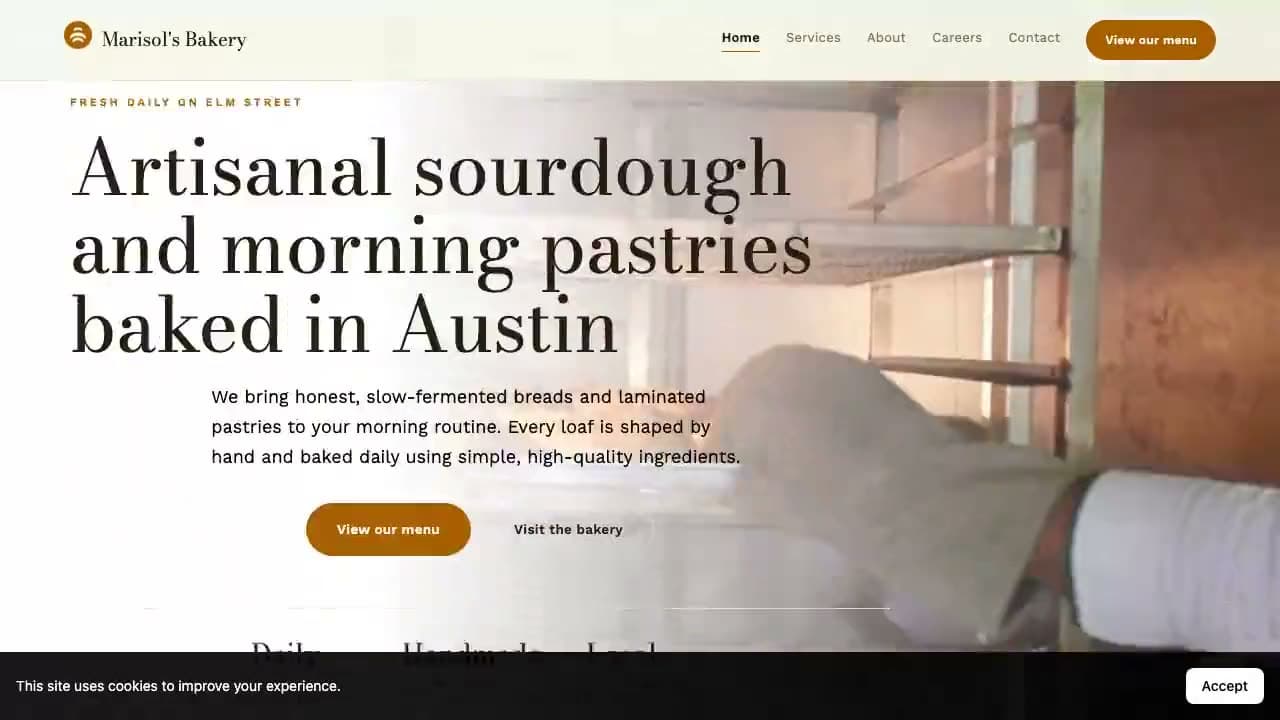
Most freelancers and agencies lose the deal in the gap between "yes, I'm interested" and "here's what your site could look like." By the time you've mocked something up, the prospect has gone cold. The fix is to close that gap to almost nothing: show them a real, finished website built from their own business, in the same conversation.
This guide walks through how to go from a cold lead to a complete, ready-to-pitch website in under a minute, using bizvoid's AI Website Builder.
Start with businesses that actually need a site
The easiest websites to sell are the ones that don't exist yet. A local business with no website, or a broken, slow, no-mobile one, has an obvious, undeniable problem and no incumbent agency to displace.
In bizvoid you scan a zip code and instantly see which nearby businesses have no website at all. Those are your warmest leads. For the full method, see how to find businesses with no website.
- No website means the clearest possible need
- You're often the only option on the table
- Real Google data (reviews, hours, photos) already exists to build from
The old way vs. the 60-second way
The traditional flow is slow: discovery call, gather brand assets, write the copy, mock up a design, send it over, days later. Each step is another chance for the lead to ghost you.
The faster flow flips the order. You bring a finished site to the first conversation. Instead of "let me put something together," it's "here's your new website, what do you think?"
How to build the website in under a minute
- Pick the business. Choose a lead from a zip-code scan, pull it straight from Google Places, or type the details in. bizvoid loads the real name, category, address, hours, reviews, and photos.
- Choose a layout. One toggle: a single long-scroll page for a quick pitch, or a multi-page site (Home, Services, About, Contact) when the prospect needs more. A second toggle, real per-page routing, is available on top of multi-page: turn it on and each qualifying service and location gets promoted to its own genuine URL instead of just another section on the same document, which is what lets those pages rank on their own for searches like "plumber in Round Rock."
- Generate. The AI writes specific, conversion-focused copy grounded in that exact business: hero, services, about, testimonials from real reviews, an FAQ, and contact details. Images come only from the business's own Google photos. The site also ships with schema.org structured data (LocalBusiness details and an FAQ schema) built automatically from the same real data, so search engines get a clean, accurate read of the business from the first generation.
- Preview, tweak, export. You get a live preview instantly. Click directly on any headline, photo, or section in the real rendered page to edit it in place with bizvoid's visual editor, or edit the theme (colors, fonts, layout system) for free, then export clean HTML to host or hand over.
What the AI actually builds
This isn't a generic template with the business name dropped in. Every section is generated from the real data:
- A hero headline that names what the business does and where
- Three to eight services derived from the business category
- Testimonials pulled from the business's actual Google reviews
- An FAQ a real customer of that business would ask
- Contact details and opening hours, straight from Google
If a business has no photos on Google, the site falls back to clean color sections instead of stock imagery: nothing fake, nothing that wouldn't hold up in front of the owner.
A real theme system, not one template with the logo swapped
The look isn't generated freeform and it isn't one shared skin with the colors changed. bizvoid ships dozens of deterministic themes across categories like restaurants, beauty and hair, real estate, health and wellness, and ecommerce, and each one is a genuinely distinct visual system: its own type pairing, shape language, palette, and density, not a recolored copy of the same layout. What you see in the theme picker is the exact site you'll get, because there's no separate freeform design pass that can drift from the preview. Pick a theme yourself, or leave it on Auto and bizvoid resolves a register that fits the business's trade automatically.
An SEO panel for every real page
Once a site exists, whether it's the homepage or a service or location page created by real per-page routing, it gets its own SEO panel where you can set the page title and meta description (with live length warnings so you don't ship a truncated snippet), hide a page from search with a noindex toggle, and see a content-depth check that tells you whether a page is thin, OK, or good based on its actual word count. Nothing here is guesswork: the panel reads the live, rendered page and reports back what's actually there.
Lead with the finished site
Once you've built it, your outreach changes completely. You're no longer asking for a meeting to discuss a project, you're showing a result.
Hi Maria, I noticed Rivera Plumbing doesn't have a website yet, so I built one for you to look at. It pulls in your real reviews and service area. Want the link? Happy to hand over the files or host it for you.
A message like that lands because it's specific and it's already done. The prospect isn't imagining what you might deliver, they're reacting to something real. For more on outreach that converts, see how to get web design clients.
Single-page or multi-page?
Use a single page when you want a fast, focused pitch: a no-website plumber or barber rarely needs more than a strong one-pager. Reach for multi-page when the business has distinct service lines or wants a fuller presence, and turn on real per-page routing specifically when the goal is to rank each service or location on its own in search, not just present them on one page. Both render from the same underlying structure, so you can start with one and regenerate as the other.
Make it yours, then hand it off
The generated site is a starting point you control. Click into any element to rewrite the copy in place, swap the theme, and adjust the SEO fields per page; saving those edits is free. When it's ready, export the HTML and take over in your own editor or hosting. Builds are metered per plan (see pricing): Starter includes 15 well-built sites a month, Pro 35, and Agency 75, with one-time credit packs if you need more.
Offer the agent in the same conversation
The site gets the business found. The next step is a customer calling, and bizvoid's Voice Agents, in beta, cover that step. A receptionist answers in one of six voices, greets callers the way you write it, answers from your list of questions and answers, and hands the call to a person when it should. A missed-call text-back agent texts anyone whose call went unanswered.
Setup takes a name, a tone, a greeting, at least one question and answer, and a voice, and "Fill from your website" can pull the answers from the site you generated. Price the site as a one-time build and the agent as a monthly fee, and send both from bizvoid's Client Billing (approval required). Running agents for clients under their own name is part of the Agency plan. How to package website and AI receptionist bundles lays out the offers.
Try it on a real lead today
The whole loop lives in one place: find a local business that needs a website, audit what's wrong, build the replacement, and pitch it. Start free, then turn your next lead into a finished site with the AI Website Builder.