AI WEBSITE BUILDER
Generate a complete local-business website with AI
bizvoid's AI Website Builder turns any lead into a finished, ready-to-pitch website, built from the business's Google listing: its category, location and hours, plus its reviews and photos where it has them, with stock photos filling any gaps. Pick single- or multi-page and one of 115 themes, refine it in Edit Mode, then publish it or export it.
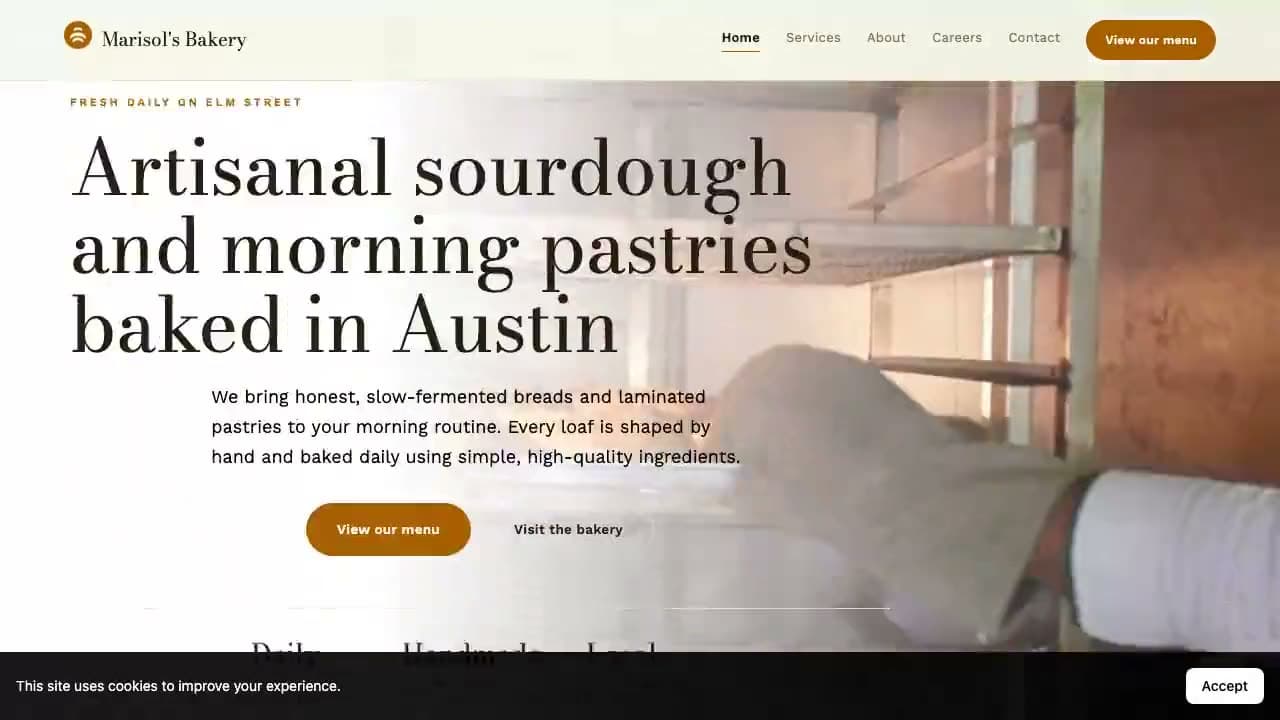
How the AI website builder works
1.Pick the business
Choose a saved lead from a zip-code scan, pull a business straight from Google Places, or enter the details by hand. bizvoid fills in the name, category, address, phone, hours, reviews and photos from its Google listing, where the listing has them.
2.Choose the layout and a theme
One toggle decides the structure: a single long-scroll page, or a multi-page site with real routes (services with a page per service, about, contact, and locations, careers and Q&A pages when there is data for them). Then pick one of 115 themes, 74 of them motion themes, or let Auto choose.
3.AI writes the site from real data
The generator writes specific, conversion-focused copy for this business (hero, services, about, FAQ and contact) from its category, listing details and reviews, and quotes its best Google reviews word for word as testimonials. Rebuilding an audited site reuses the old site's wording. Photos come from your uploads and the business's Google photos first, with stock photos filling any gaps.
4.Edit, then publish
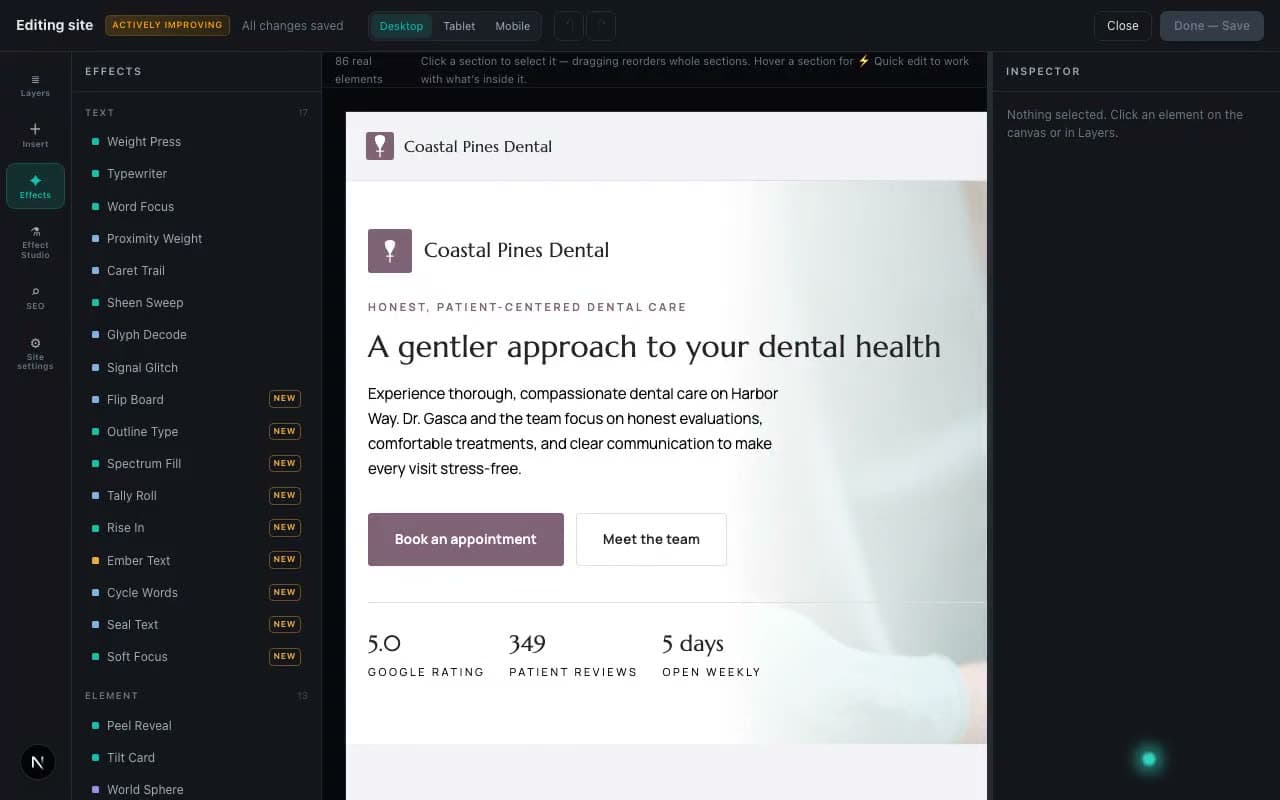
Refine it in Edit Mode: drag, resize, set tablet and mobile layouts, insert blocks, add effects and restore earlier versions. Publish it to a bizvoid.app subdomain or the client's own domain, keep it on a private review link until the client pays, or export it as a ZIP or to GitHub.
What makes it different
Built from real Google Business data
Every site starts from the business's Google listing: its category, location and hours, its best reviews quoted word for word, and its photos where it has them, with stock photos filling any gaps.
115 themes, 74 of them in motion
41 classic themes and 74 motion themes with scroll-pinned sections, parallax, 3D tilt, cursor effects, particle fields and slow-zoom photo heroes. Heroes can run a background video, a photo carousel or a curved carousel.
Single-page or multi-page, your call
Generate a focused one-pager for a quick pitch, or a full multi-page site with a page per service, plus journal posts and custom pages when the prospect needs more.
Tier-aware quality
Starter builds on a fast model; Pro adds an automatic quality check that repairs weak drafts; Agency runs the top-tier model on every build. Your plan picks the right engine automatically.
A real visual editor
Edit Mode: click any element to change it, drag and resize, tune desktop, tablet and mobile separately, insert any of 13 blocks (carousels, review lists, stat counters and more), add any of 102 effects, and roll back with version history. Saving edits is free.
Goes live when the client pays
Send the client an invoice from the Site Builder with Client Billing. The private site goes live the moment it is paid, and the deal moves to Won on your pipeline.
Priced per build, with rollover
A single-page site is 1 credit, a multi-page site 2, and a motion theme adds 1 (Starter 15 · Pro 35 · Agency 75 credits per month). Pro and Agency roll over 10% of unused credits and can buy one-time credit packs that never expire.
Part of the whole outreach loop
Find businesses with no website, audit the broken ones, then build the replacement and pitch it: all in one tool, from one lead list.
FAQ
What is the bizvoid AI Website Builder?
It generates a complete small-business website from data you already have: the business's name, category, location and hours from its Google listing, plus its reviews and Google photos where it has them. You pick single- or multi-page and a theme, the AI writes the copy, and you get a live preview you can edit in Edit Mode, publish or export.
Where does the content and imagery come from?
The AI writes the copy, including the services list, from the business's category, its Google listing and its reviews, and quotes its best reviews word for word as testimonials. A rebuild of an audited site reuses the old site's wording. Photos come from your own uploads and the business's Google photos first; when a business has few photos, stock photos fill the gaps, and a video hero uses your own clip or a stock one.
Single-page or multi-page websites?
Both. A toggle in the builder chooses a single long-scroll page or a multi-page site with real routes: services with a page per service, about, contact, and locations, careers and Q&A pages when there is data for them. Journal posts and custom pages can be added after.
What are motion themes?
74 of the 115 themes are motion themes, with scroll-pinned sections, parallax, 3D tilt, cursor effects, particle fields and slow-zoom photo heroes. A motion theme adds 1 credit to a build, and its animation respects each visitor's reduced-motion setting.
How many sites can I build?
Monthly Site Builder credits depend on your plan: Starter 15 · Pro 35 · Agency 75. A single-page site costs 1 credit, a multi-page site or a rebuild of an audited site 2, and a motion theme 1 more. Pro and Agency roll over 10% of unused credits and can buy one-time credit packs that never expire.
Can I edit the generated website?
Yes, in Edit Mode: change text, fonts and colors, swap photos and videos, drag and resize, set tablet and mobile layouts, insert blocks, add effects, and restore earlier versions. Saving edits is free; a full re-generation is charged as a new build.
How do I publish it for a client?
Publish through your connected Netlify account to a bizvoid.app subdomain or the client's own domain, or keep it on a private review link. Send an invoice with Client Billing and the site goes live automatically when the client pays. You can also export a ZIP or push it to GitHub.
Is the Site Builder included on the free plan?
The Site Builder is a paid feature (Starter, Pro and Agency). You can start free to find and audit leads, then upgrade to turn them into finished websites.
From lead to live-ready website
Find a business, build its site, and pitch it. The Site Builder is on Starter, Pro and Agency.
Get started →